Gamma vs Beautiful.AI: Which Wins for Executives? (2026)
Gamma vs Beautiful.AI — an honest comparison for executives. One builds the deck. One designs it. Here's which belongs in your workflow and why.

Most executives comparing Gamma and Beautiful.AI are looking for the same thing: a faster way to produce a deck that doesn't embarrass them. What they're not expecting is that these two tools are solving different problems — and choosing the wrong one for the wrong job is how you end up with a deck that's fast but wrong, or polished but still blank at midnight.
Here is the clearest way to separate them: Gamma is a web-native narrative tool that can impersonate a deck. Beautiful.AI is a presentation tool with design automation built in. Gamma generates content — you describe what you need and it builds a structured story, which it can render as a presentation, a document, or a webpage. Beautiful.AI designs slides — you supply the structure and it handles the layout, consistency, and visual hierarchy. The AI in Gamma is doing the writing. The AI in Beautiful.AI is doing the formatting.
That distinction determines everything: which one saves you time, which one your team can actually use consistently, and which one shouldn't be within a mile of your Series B pitch.
Gamma is the fastest way to generate a usable story. Beautiful.AI is the safest way to make that story look like your company meant it.
Pricing and feature data as of April 2026. Verify at gamma.app/pricing and beautiful.ai/pricing before committing.
| Gamma | Beautiful.AI | |
|---|---|---|
| Primary use case | AI generation from prompt or outline | AI-assisted design with smart layouts |
| Free tier | Yes — 400 AI credits at signup | No — 14-day trial only |
| Individual paid | Plus: $9/mo (annual) · Pro: $18/mo | Pro: $12/mo (annual) |
| Premium tier | Ultra: $90/mo (annual) | — |
| Team / Enterprise | Contact sales (no team SKU) | Team: $40/user/mo (annual) |
| Export formats | PDF, PPTX, PNG, Google Slides | PPTX, PDF, Google Slides |
| Output types | Presentations, documents, websites | Presentations only |
| G2 rating | 4.7 / 5 | 4.6 / 5 |
Quick Verdict
Our Verdict
Winner: Default for individuals and fast generation: Gamma. Default for teams with brand standards and executive-facing decks: Beautiful.AI.
If you need a working draft of a presentation in under 10 minutes — starting from a prompt, an outline, or rough notes — Gamma has no real competition at this price point. It's genuinely faster, and the output is good enough for internal use, briefings, and working sessions. For many executives, that covers 80% of what they use decks for. Beautiful.AI's argument is different: it's not faster from a blank slate, but it produces decks that look like a real company made them — consistent layouts, enforced brand standards, polished design. Start with Gamma. Move to Beautiful.AI only when the audience is external, brand consistency is a documented problem, and the $40/user/month team cost can be justified. That's a narrower use case than the Beautiful.AI marketing implies.
- Individual executive, fast internal decks → Gamma
- Team with brand kit, client-facing presentations → Beautiful.AI
- Starting from a prompt with no structure → Gamma
- Enforcing design consistency across a team → Beautiful.AI
- Budget-conscious individual → Gamma (free tier is genuinely useful)
- Board deck, investor pitch, anything that needs to look like it cost money → Beautiful.AI — and review it before sending
Feature Scores
Scores reflect practical output quality in real executive workflows — not spec comparisons. Based on editorial testing and user data as of April 2026.
| Feature | Gamma | Beautiful.AI |
|---|---|---|
| AI generation speed (prompt → draft) | 10 | 5 |
| Design quality & visual polish | 7 | 9 |
| Brand control & consistency | 4 | 9 |
| PowerPoint export quality | 6 | 9 |
| Ease of use / learning curve | 9 | 7 |
| Team collaboration & admin controls | 6 | 9 |
| Pricing value (individual) | 9 | 6 |
| Output versatility (web / doc / slide) | 9 | 5 |
Detailed Breakdown
AI Generation Speed
As of April 2026: Gamma generates a full presentation from a prompt in under 2 minutes and can render the same content as a presentation, document, or webpage. Beautiful.AI has no equivalent prompt-to-deck generation — it starts with templates and smart layout automation.
This is the clearest gap — and it's wider than most comparisons acknowledge. Gamma isn't just faster; it operates from a different starting point. The underlying model generates narrative: it takes a prompt or an outline and produces structured written content, which it then renders visually. The output format (presentation, document, or webpage) is almost secondary. This matters for executives whose work crosses formats — the same strategic brief that becomes a presentation might also need to exist as a one-pager or a client-facing webpage. Gamma handles that in a single workflow. Beautiful.AI does not.
Beautiful.AI doesn't do content generation. You start by selecting a template or a slide type, then populate it with your own writing. The AI handles layout decisions as you add content — it adjusts spacing, resizes elements, maintains visual hierarchy — but you're still the one writing and structuring. It's design assistance applied to content you already have.
Score rationale: Gamma wins this category entirely. If speed from nothing or cross-format versatility is the primary job, Beautiful.AI isn't in the conversation.
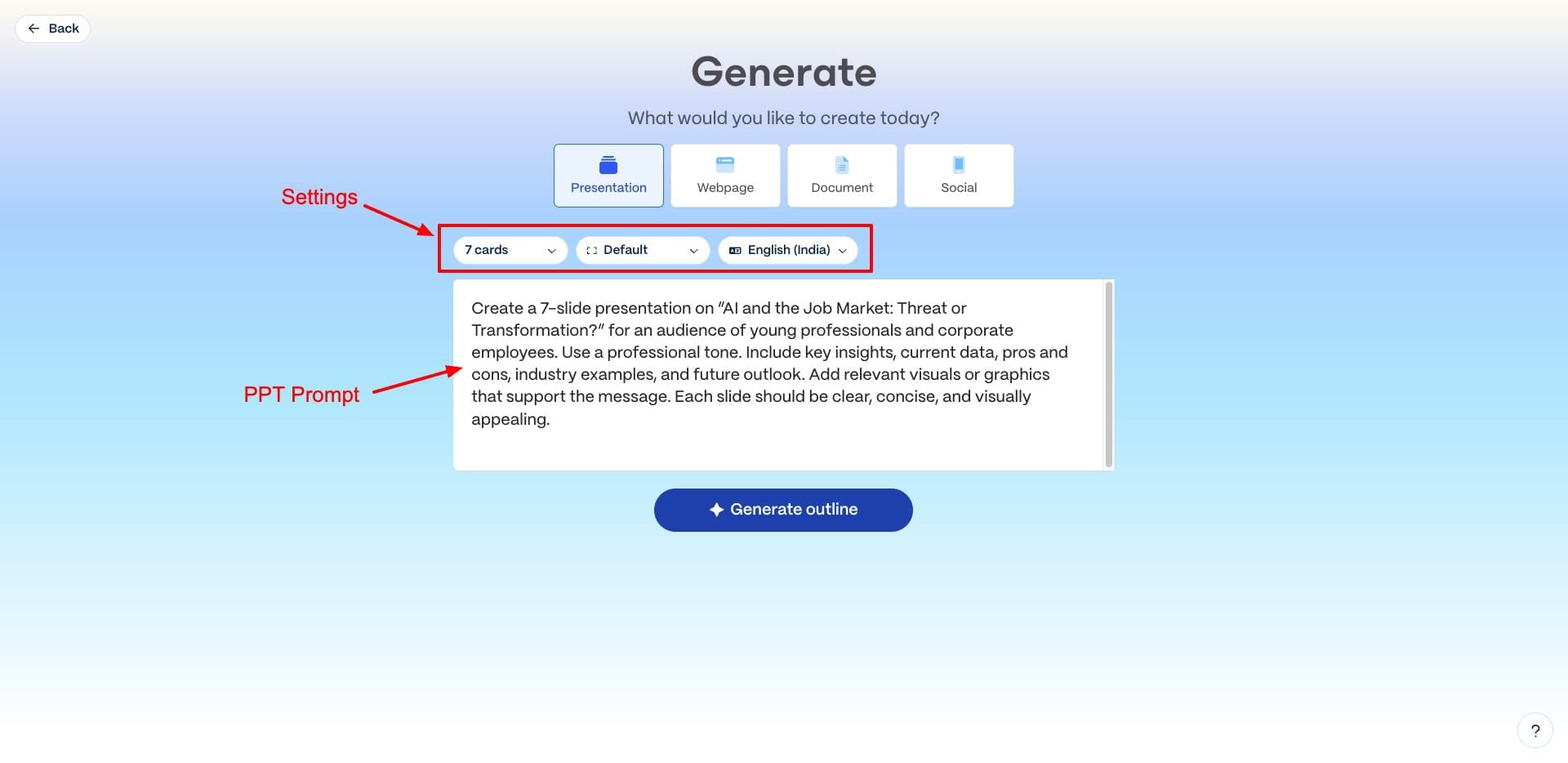
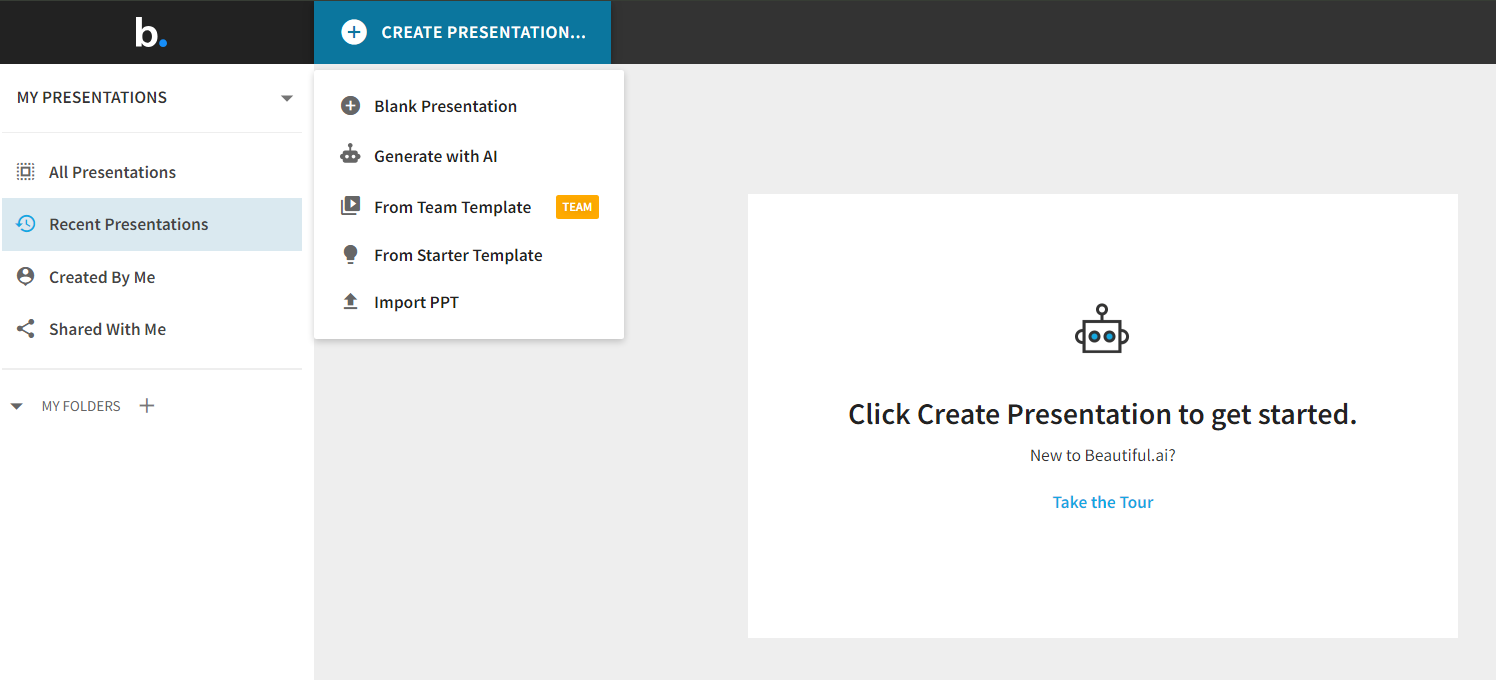
Starting from nothing: Gamma generates a structured deck from a prompt; Beautiful.AI's DesignerBot accepts a prompt but pushes you into a template flow.
Design Quality & Visual Polish
As of April 2026: Qualitative comparison based on testing. Beautiful.AI is widely cited as the more polished output for executive and client-facing decks.
Gamma's output is clean. The templates are modern, the typography is controlled, and for a deck generated by AI from a prompt, the results are consistently respectable. The issue is predictability: Gamma's card-based design system makes it hard to achieve pixel-level control. Elements are sized and positioned by Gamma's layout engine, and fighting the engine to get something specific costs more time than the speed advantage saved.
Beautiful.AI's automated layout engine — its core differentiator — does something different. As you add content, the layout adapts. Text stays readable. Images reposition. Alignment is maintained. The result is slides that look like a designer made intentional choices, because the AI is managing those choices consistently. For executives who don't have a design eye and can't afford to have someone polish their decks, Beautiful.AI bridges that gap in a way Gamma doesn't.
Score rationale: For internal decks and working sessions, Gamma is good enough. For anything going to a client, board, or investor, Beautiful.AI's design quality is visibly different.
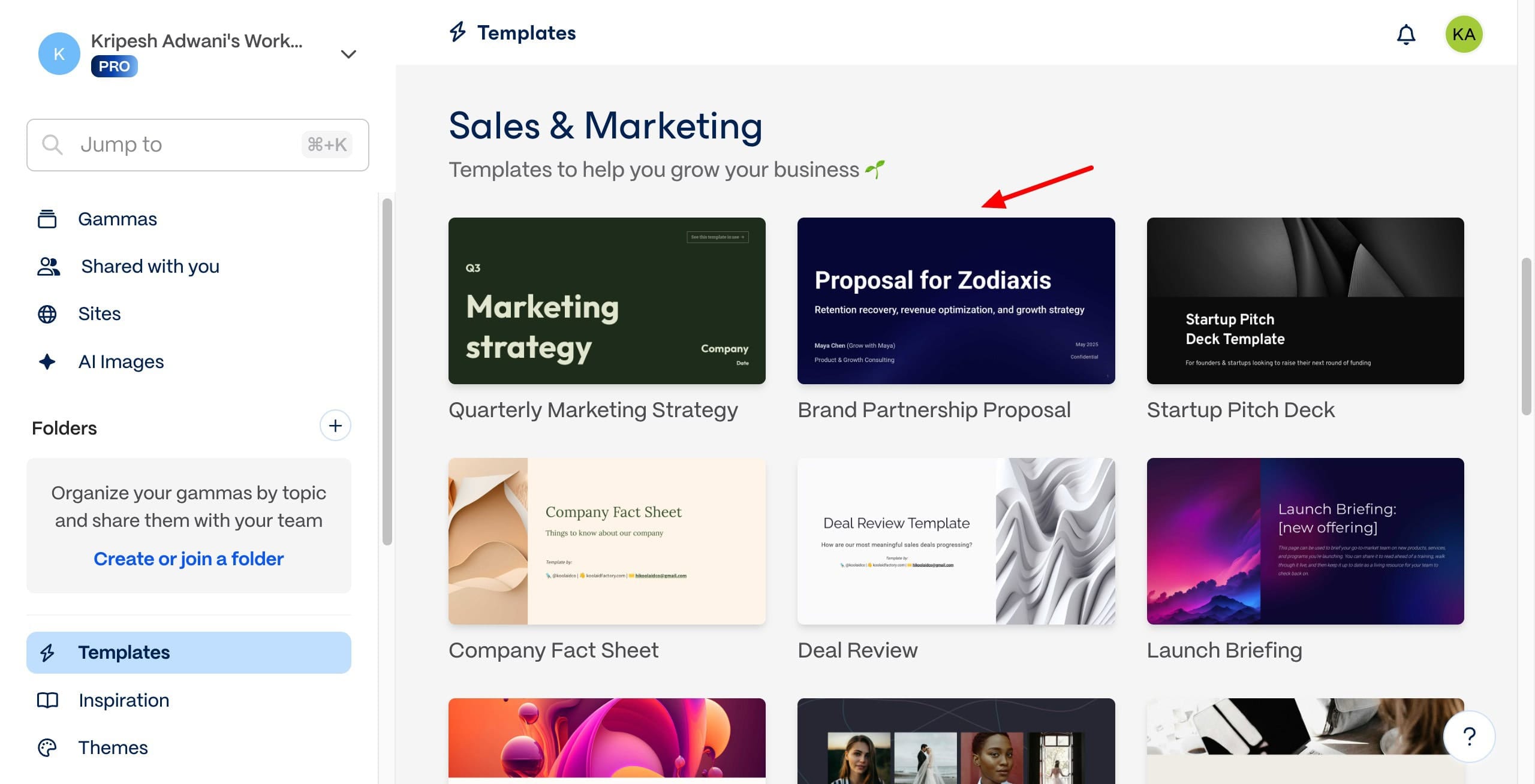
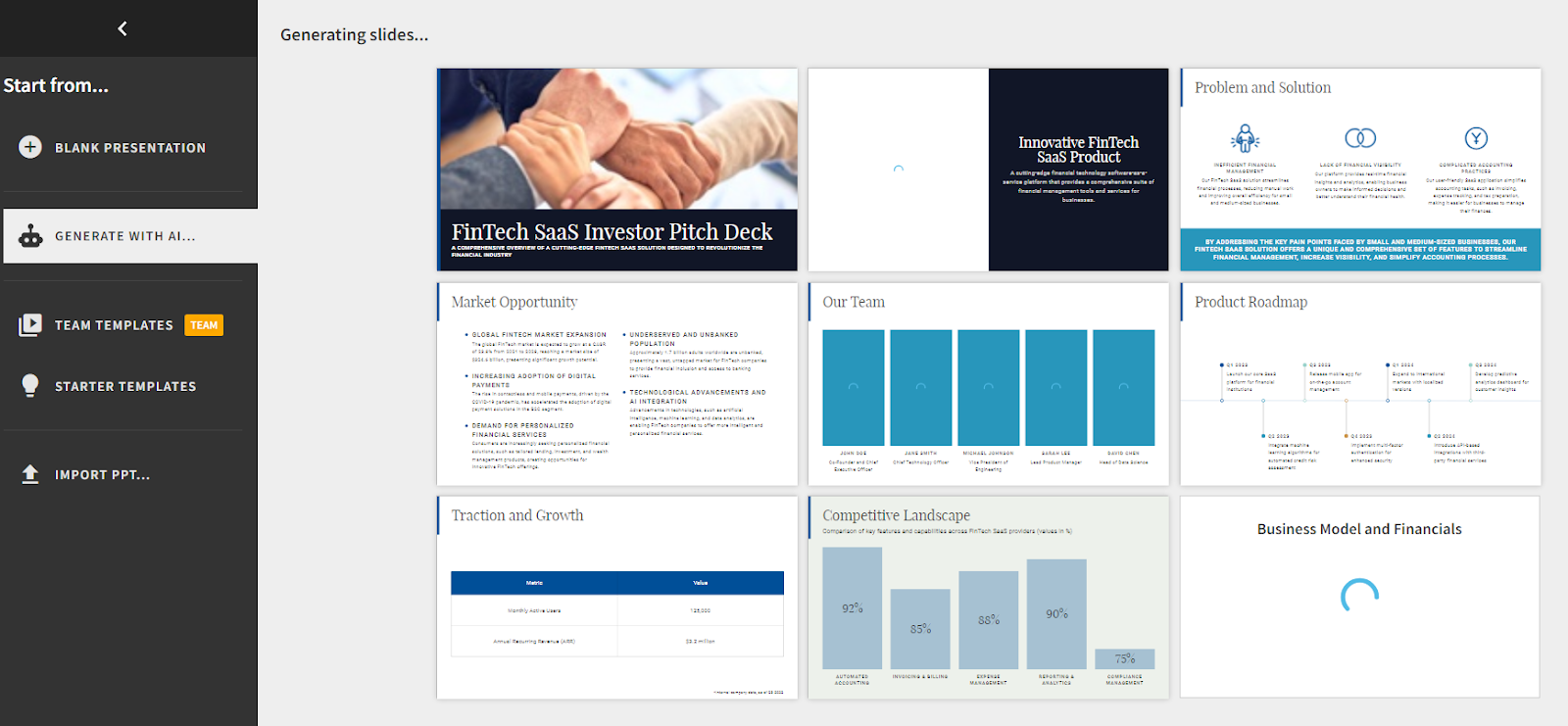
Design register, side by side: Gamma's output is modern and consistent but recognizably AI-generated; Beautiful.AI's slides feel built rather than generated.
Brand Control & Consistency
As of April 2026: Beautiful.AI Pro includes brand kit (colors, fonts, logo). Team plan adds shared brand libraries and admin enforcement. Gamma's brand controls are limited to theme-level customization.
This is where the difference between a personal tool and a team standard becomes clear. Beautiful.AI's brand kit lets you define your palette, typography, and logo once — and every deck produced by every team member stays inside those parameters. Admin controls on the Team plan let you enforce which templates are available and lock brand elements against accidental modification.
Gamma gives you theme options and some customization — but it doesn't enforce brand standards at a team level. Individual users can deviate. Over time, across a team, Gamma decks start to look inconsistent in ways that undermine the professionalism the tool is supposed to deliver.
Score rationale: If brand consistency matters — and for any team in a client-facing or investor-facing role, it does — Beautiful.AI wins this by a wide margin.
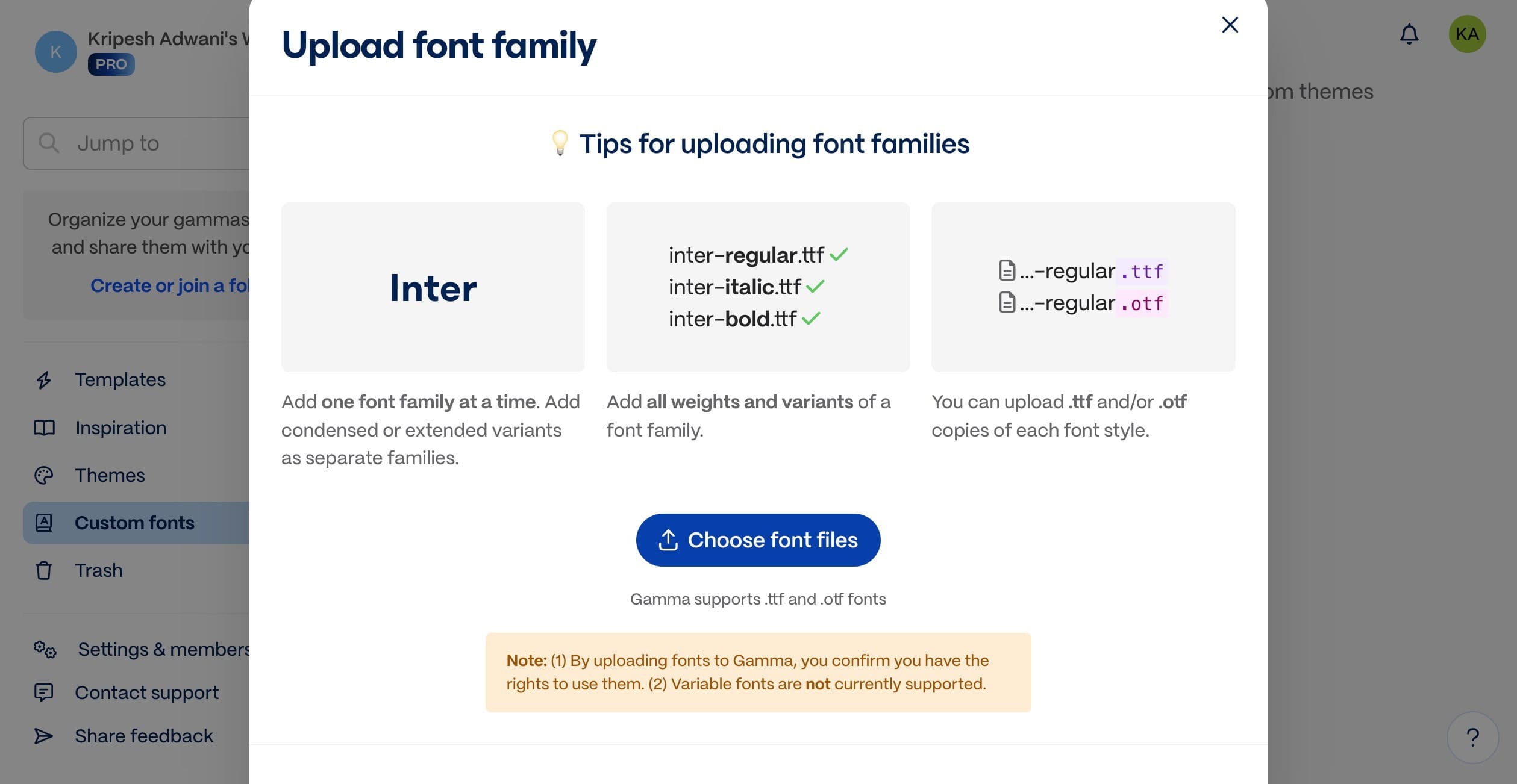
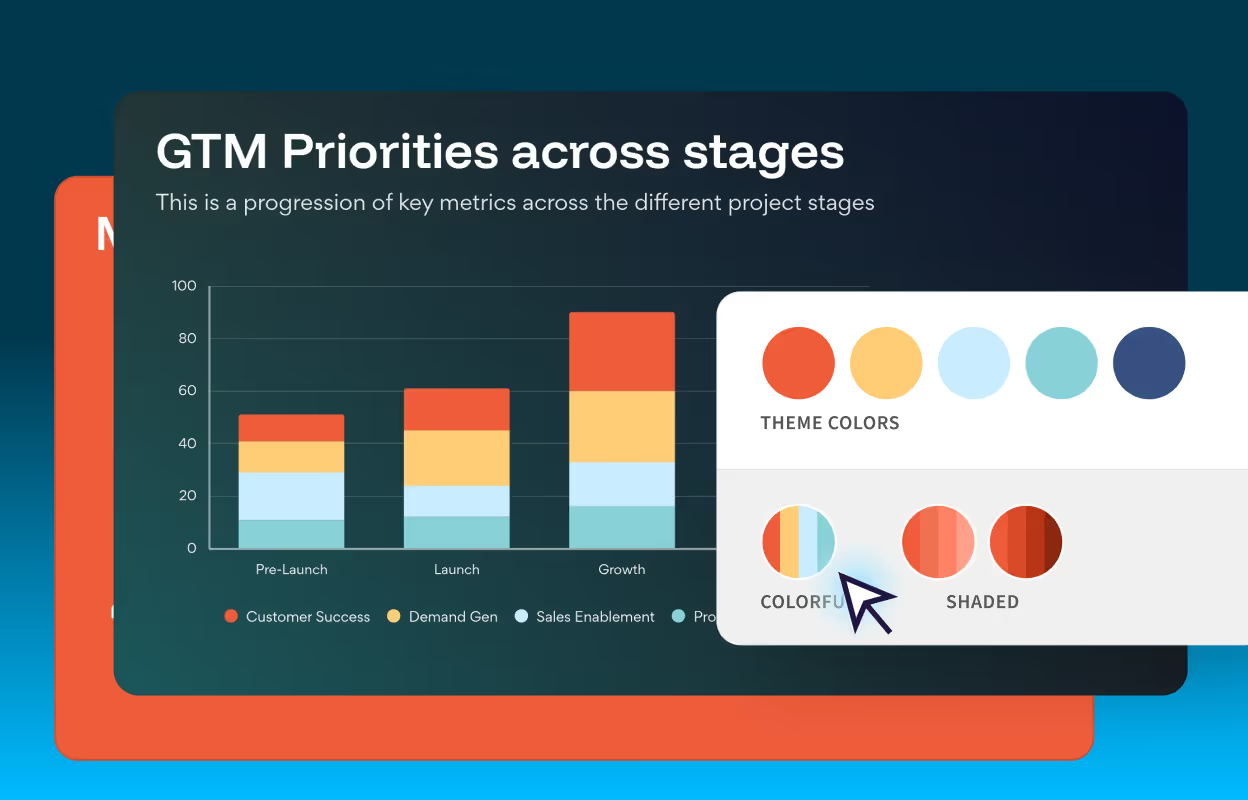
Brand enforcement: Gamma gives themes you can customize; Beautiful.AI's brand controls lock palette, typography, and logo across every deck every team member produces.
PowerPoint Export Quality
As of April 2026: Both tools export to PPTX. Gamma's export quality is cited as inconsistent due to its web-native, card-based architecture. Beautiful.AI's export is widely regarded as the cleaner PPTX output.
Gamma is web-native. Its interactive elements, transitions, and card-based layouts don't always survive the journey to PPTX. Users regularly report formatting shifts, font substitutions, and layout changes in the exported file. The practical consequence: if the recipient opens the file in PowerPoint instead of clicking your live link, Gamma becomes a formatting risk. That's not theoretical — it's the difference between a deck that looks intentional and one that looks broken. For any presentation where you can't guarantee the audience will use your link, test the export before sending.
Beautiful.AI's PPTX export is cleaner because its underlying structure is closer to traditional slide architecture. What you see in Beautiful.AI is closer to what your audience opens in PowerPoint. For organisations where decks are shared as files, embedded in emails, or edited by clients, that reliability matters.
Score rationale: For any deck where the recipient will open the PPTX rather than click a link — which is most board and client presentations — Beautiful.AI is the safer choice.
Pricing Value
As of April 2026: Gamma Plus $9/seat/month (annual), Pro $18, Ultra $90. Beautiful.AI Pro $12/month (annual). The individual pricing gap is modest. The team-tier gap is significant: Beautiful.AI Team is $40/user/month, and Gamma has no defined team SKU — collaboration features are bundled into Pro/Ultra at the seat level.
At the individual level, both tools are affordable and the gap is small. Gamma's free plan is genuinely useful — 400 AI credits at signup covers roughly 10 presentations, which is enough for most individuals to evaluate whether it fits their workflow before spending anything.
The team-tier gap is where this gets important. Beautiful.AI's Team plan is $40/user/month — 233% more expensive than its Pro plan and more than four times Gamma's Plus plan. That jump is significant for any team trying to standardize on it. The Team plan includes brand libraries, shared templates, collaboration, and admin controls — features that don't exist on the Pro plan and that are the whole point of using Beautiful.AI at scale. But the license cost needs to be justified by the output quality improvement.
Score rationale: Gamma wins on individual value. Beautiful.AI's team pricing requires a clear business case before committing.
Where Each Tool Breaks
Failure modes as of April 2026, based on testing and user data.
Where Gamma breaks:
- The "looks AI-generated" ceiling. Gamma's output is immediately recognizable to anyone who's seen AI-generated decks. For a working session or internal briefing, that's irrelevant. For a board presentation, an investor pitch, or a client deck where your credibility is on the line, the design language can work against you. The question isn't whether Gamma is good — it's whether "AI-generated" is the signal you want to send.
- Export fragility. Gamma is built for the web. When you need a PPTX that a client can open, edit, and present offline, the export experience is inconsistent. Elements shift. Fonts substitute. If the recipient won't use the live link, test the export before assuming it's presentation-ready.
- No team brand enforcement. Gamma doesn't prevent your team from going off-brand. Over time, decks produced by different people using Gamma diverge — different color choices, different layout decisions, different feels. For a team with a brand to protect, Gamma's customization ceiling becomes a liability.
- Card-based structure limits complex data visualization. Gamma's layout engine makes decisions for you. When a slide needs a specific table configuration, a non-standard chart layout, or a precise arrangement of elements, the engine gets in the way. Data-heavy presentations that require exact formatting are better built elsewhere.
Where Beautiful.AI breaks:
- No prompt-to-deck generation. If you're starting from nothing and need a structure fast, Beautiful.AI won't help you the way Gamma does. You're selecting a template and building the deck. The AI handles design, not content. For executives who wanted AI to do the thinking, Beautiful.AI is a design tool, not a thinking tool.
- The $40 team plan cliff. The jump from Pro ($12) to Team ($40) is steep — and the collaboration and brand features you actually need for a team standard only exist on the Team plan. A five-person team standardizing on Beautiful.AI costs $200/month. That requires a clear ROI conversation before it gets approved.
- Design guardrails frustrate power users. Beautiful.AI's layout automation is its strength and its constraint. When you need something the template doesn't support — a specific element position, a custom layout, a non-standard slide type — the guardrails fight you. Creative professionals and design-aware users often find Beautiful.AI more limiting than alternatives like PowerPoint or Canva.
- Presentations only. Beautiful.AI builds slides. Gamma builds presentations, documents, and websites. If your workflow includes creating content in multiple formats — a brief that also becomes a deck that also becomes a landing page — Beautiful.AI requires a different tool for each.
Pricing Comparison
Pricing as of April 2026. Verify at gamma.app/pricing and beautiful.ai/pricing before purchasing.
| Plan | Gamma | Beautiful.AI |
|---|---|---|
| Free | Yes — 400 AI credits at signup, Gamma branding | No — 14-day trial only |
| Individual | Plus: $9/seat/mo (annual) | Pro: $12/mo (annual) |
| Individual premium | Pro: $18/seat/mo (annual) | — |
| Top tier | Ultra: $90/seat/mo (annual) | — |
| Team | Contact sales (no defined tier) | $40/user/mo (annual) · $50 monthly |
| Enterprise | Contact sales | Custom (20+ users) |
| One-off purchase | Not available | $45 per single presentation |
The real cost of Beautiful.AI at team scale: A five-person team on Beautiful.AI Team costs $200/month ($2,400/year). At that price point, the question isn't whether Beautiful.AI is a good tool — it's whether the design consistency and brand enforcement are worth $2,400 more than what Gamma or PowerPoint would cost. For client-facing teams where brand discipline directly affects revenue, it often is. For internal teams, it often isn't.
Gamma's free plan is a genuine entry point. 400 credits is enough to understand whether the tool fits your workflow before committing. No other AI presentation tool at this quality level offers a comparable free tier.
Best For (Use-Case Verdict)
| Use case | Pick | Why |
|---|---|---|
| Fast draft from a prompt | Gamma | No other tool at this price generates a structured deck this quickly |
| Board presentation or investor pitch | Beautiful.AI | Design quality and export reliability reduce the risk of looking unprepared |
| Client-facing decks with brand standards | Beautiful.AI | Brand kit + layout consistency; Gamma can’t enforce this |
| Internal briefings and working sessions | Gamma | Speed matters more than polish; Gamma’s quality is sufficient |
| Team standardization | Beautiful.AI | Shared brand libraries and admin controls; Gamma has neither |
| Individual executive, no design background | Gamma | Fastest path from idea to usable deck |
| Data-heavy presentations | Neither | Both tools constrain complex data layout — consider PowerPoint + AI |
| Content that lives beyond slides (docs, web) | Gamma | Beautiful.AI produces presentations only |
Bottom line: Start with Gamma. It's the right default for individuals, small teams, internal decks, and anyone solving for speed. Move to Beautiful.AI only when three things are true simultaneously: the audience is external, brand consistency is a documented problem, and the team cost is justified by what inconsistency is costing you. That combination is real — but it's rarer than the Beautiful.AI pricing page implies. If you're not sure, Gamma's free plan gives you 10 presentations to find out.
The Real Decision: Three Questions That Determine Which Tool To Use
The Gamma vs. Beautiful.AI comparison looks like a tool question. It's actually three separate questions, and the answers tell you everything:
Question 1: Personal drafting tool or team standard?
If you're solving your own problem — producing decks faster without involving your team — Gamma is the default. The free plan is genuinely functional, the Plus plan is cheap, and the speed advantage is real. Stop here.
If you're solving a team problem — every person on your team needs to produce presentations that look like they came from the same company — the calculation changes fundamentally. Beautiful.AI's Team plan ($40/user/month) is the more defensible choice, but it requires change management: onboarding, brand kit configuration, template governance, and audit. That's not a tool decision. It's a process investment.
Question 2: Live-link storytelling or traditional slide file?
Gamma's natural format is a shareable web link — interactive, live, optimised for a screen. That's genuinely better for many modern presentation contexts. But if your audience will open a PPTX, edit it, or forward it as a file — which is still the default behaviour in most board and client contexts — Gamma introduces export risk. Beautiful.AI's PPTX output is more reliable because it was designed for that workflow.
Before choosing, ask yourself: does my audience click links or open files? The answer determines more than any feature comparison.
Question 3: Do you have a story, or are you still finding one?
This is the question neither tool's marketing will ask you. A Gamma deck generated from a vague prompt is a fast draft of the wrong presentation. A Beautiful.AI deck built from a weak outline is a beautifully designed version of the wrong argument. Neither tool produces narrative clarity — they render it. If you don't know what decision this deck needs to move, or what the audience already believes, the design tool doesn't matter.
Start with the thinking. The AI handles the visual from there.
If you're building high-stakes presentations for boards or investors: Read How to Build an Executive Presentation with AI in 30 Minutes first. The design tool is the last decision, not the first.
Get 100 prompts built for how executives actually work.
The Executive AI Toolkit covers strategic thinking, communication, people decisions, meeting prep, and more — across whichever tool you choose to use.
$67. One purchase. No subscription.
Get the Executive AI Toolkit — $67Related comparisons
Related articles
- How to Build an Executive Presentation with AI in 30 Minutes — the narrative-first workflow that makes any design tool more effective
- Best AI Productivity Tools for Executives — where Gamma fits in the full executive AI stack
- The Executive's Complete Guide to AI in 2026
Benchmark & Data Sources
Factual claims in this comparison are based on the following publicly available sources, verified April 2026:
- Gamma pricing: Free (400 credits at signup), Plus $9/seat/mo annual, Pro $18/seat/mo annual, Ultra $90/seat/mo annual — verified at gamma.app/pricing
- Beautiful.AI pricing: Pro $12/month annual, Team $40/user/month annual — Beautiful.AI Pricing
- Beautiful.AI — no free tier: 14-day trial only — Beautiful.AI Blog
- Gamma export limitations (PPTX formatting issues): NextDocs comparison · Plus.ai comparison
- Gamma card-based layout constraints: SelectHub comparison
Qualitative assessments (design register, export experience, brand enforcement) are based on editorial testing and published user comparisons, labelled as such throughout.
Gamma generates the story. Beautiful.AI designs the slide. Most executives need one of them — not both — and the answer depends on whether you're solving for speed, brand discipline, or a deck your audience can't tell an AI made.
Free guide + weekly newsletter
Get Started with AI in One Day — Free
Subscribe and get our free 15-page starter guide instantly. Then weekly AI workflows, honest tool takes, and strategies for senior professionals. No fluff. Unsubscribe any time.